10 Best Keys Locator Devices for Global Buyers

Losing keys can disrupt a commute, delay a meeting, or leave a traveler searching an unfamiliar hotel room. A Keys Locator can make that search easier, but its usefulness depends on more than a loud alert. Connection range, phone compatibility, battery life, and the way location updates work all affect everyday performance. No tracker is magic. A device that works well at home may offer fewer options when its user changes phones, crosses borders, or loses access to a particular app or network.

This guide compares ten Keys Locator devices for buyers in different regions. It looks at practical details: whether a model uses Bluetooth or a wider finding network, how clearly its app explains location information, and whether its battery is rechargeable or replaceable. Coverage matters. So do language support, water resistance, attachment size, and the cost of ongoing services. These details can be easy to miss in product listings, and specifications may vary by version or market. Small print deserves attention.

The right choice depends on where and how the device will be used. Someone who misplaces keys inside an apartment may value a simple sound alert, while a frequent traveler may prioritize broader network support and dependable app access. Buyers should also review current compatibility and privacy settings before purchase. This comparison aims to clarify those trade-offs without treating any single device as the best fit for everyone. Some differences are subtle, but they can matter on a rushed morning.

10 Best Keys Locator Devices for Global Buyers

How Key Locator Devices Work and Which Technologies They Use

A key locator usually combines a small radio transmitter with a phone app. Most use Bluetooth Low Energy, which sends brief signals while conserving battery power. When keys are nearby, the app estimates their distance from signal strength. A sound alert can help you find them under a coat or between sofa cushions. Near the sofa, listen carefully.

Bluetooth distance is approximate. Walls, metal cabinets, and crowded radio environments can weaken or distort the signal. Some newer devices use ultra-wideband technology to show more precise distance and direction, but both the locator and phone need compatible hardware. That is not magic; a signal can still behave oddly in a cluttered home.

Beyond Bluetooth range, some systems rely on a network of participating phones. A nearby phone can detect the locator and update its approximate position in the app, usually without revealing the finder’s identity. Coverage depends on how many compatible devices pass nearby, so results may vary in rural areas or while traveling. Many compact locators do not contain GPS; they may show the last place your phone connected instead. Check battery life, phone compatibility, and network coverage before choosing one. The tiny device can help, but it cannot guarantee a live location everywhere.

Types of Key Finders Available to Buyers Worldwide

Key finders fall into four practical types. Bluetooth tags connect directly to a nearby phone and suit keys kept around the home or office. Their alerts are quick, but walls and interference can shorten useful range. Crowdsourced-network tags add another layer: nearby participating phones may update a lost item’s location. Coverage varies by place, so busy cities often offer better odds than quiet rural areas.

Radio-frequency finders use a paired remote and receiver, making them useful indoors without an app or internet connection. GPS and cellular trackers can report locations farther away, but they usually need charging, mobile service, and sometimes a subscription. No device is magic. Check battery life, phone compatibility, water resistance, and replacement costs before buying. A claimed “unlimited range” deserves scrutiny; it often depends on network access.

The Bluetooth SIG’s 2024 Market Update forecasts 7.5 billion annual Bluetooth device shipments by 2028, showing the technology’s broad reach, not tracker sales specifically. ITU’s Facts and Figures 2024 estimates that 5.5 billion people, or 68% of the world’s population, use the internet. That global figure does not guarantee equal tracker coverage. For international buyers, local phone compatibility and network availability matter more than a sleek map screen. One detail is easy to miss. A simple indoor finder may be more dependable than a connected tracker where coverage is patchy.

Key Finder Types: Approximate Local Finding Range

Indicative upper-end local ranges for common key-finder technologies.

Typical ranges vary by device, obstacles, and surroundings. GPS/cellular and crowd-assisted finders can support locating beyond local radio range, so they are not directly comparable here.

Factors to Compare Before Choosing a Key Locator

Compare key locators by how they work in your actual routine, not just by advertised range. A Bluetooth model can help find keys inside a home, but walls and furniture may weaken its signal. For misplaced keys farther away, check whether the device relies on a wider tracking network and whether that network works where you live or travel. Phone compatibility matters too. Confirm the app supports your operating system and preferred language before buying.

Tips: Test the locator from a few rooms away. Check its sound level near a sofa or inside a coat pocket. Small details matter.

Battery life, attachment style, and weather resistance deserve a close look. A slim tag may fit neatly on a key ring, while a thicker model could be easier to hear or handle. Check whether its battery is replaceable and how the maker describes water resistance; those details can be vague, so read the specifications carefully. If you travel across regions, review app availability and customer support options. One trade-off is easy to miss: a locator with more features may require more setup and phone permissions. Consider what you will actually use, and remember that no locator can guarantee a recovery.

10 Best Keys Locator Devices for Global Buyers - Factors to Compare Before Choosing a Key Locator

Comparison of common key-locator device types. Ranges and battery life are typical estimates, not guaranteed specifications; walls, interference, phone compatibility, usage, and local network coverage can affect performance.

Locator type Connection / finding method Typical nearby range Out-of-range finding Power and upkeep Phone / network needs Best suited to Main trade-off
1. Bluetooth network tracker Bluetooth signal for nearby searches; participating phones can report its last detected location. Often about 10–60 m in open conditions; less indoors. Possible through a compatible crowdsourced finding network when another participating device comes nearby. Commonly uses a replaceable coin cell; service life varies by model and alert use. Requires a compatible phone, app, and supported finding network for remote updates. Everyday keys lost at home or in places where the network has good coverage. Remote finding depends on nearby network users and regional service support.
2. Ultra-wideband (UWB) tracker Bluetooth discovery plus UWB direction and distance guidance with compatible hardware. Usually room-scale; practical precision depends on the environment and compatible phone. May use a compatible crowdsourced network, like other network-enabled Bluetooth trackers. Typically coin-cell powered; battery life varies with hardware and use. Precise direction finding requires a UWB-capable phone and supported software. Users who want guided, close-range searches and have compatible phones. UWB benefits are unavailable on phones without compatible UWB hardware.
3. Bluetooth tracker with replaceable coin cell Bluetooth connection to a phone app; some versions also support a finding network. Often about 10–60 m in open conditions; indoor range is typically shorter. Only if the particular device and app support remote network finding. Coin cell can be replaced by the user; check battery type and availability locally. Needs Bluetooth and a compatible app; network features vary by device ecosystem. Buyers who prefer replaceable batteries and simple everyday use. A replacement battery is eventually needed; remote coverage is not universal.
4. Rechargeable Bluetooth tracker Bluetooth proximity alerts and app-based sound or last-seen location; some support a finding network. Often about 10–60 m in open conditions; walls and interference reduce range. Available only where the tracker’s app or supported network provides it. Built-in rechargeable battery; charge interval varies, and the battery may not be user-replaceable. Requires a compatible phone and charging access; check app and network availability. Users who want to avoid buying disposable coin cells. Needs periodic charging; a flat battery prevents tracking.
5. RF remote-and-receiver key finder A dedicated handheld remote activates a sound or light on the paired receiver using radio frequency. Often about 20–60 m in open conditions; obstacles can shorten it. No general remote location; works when the receiver is within radio range. Remote and receiver use batteries; types and replacement intervals vary by set. Does not require a smartphone, app, internet, or account. Home use, including households that prefer a dedicated physical button. The remote itself must be available, and it cannot locate keys far away.
6. Multi-receiver RF key-finder set A single remote selects among several radio receivers, each with its own sound or light alert. Often about 20–60 m in open conditions, subject to obstacles and interference. No remote network finding; the selected receiver must be within range. Battery-powered remote and receivers; check whether batteries are included and replaceable. No smartphone or internet needed. Families or shared homes that want to label and locate several items. More receivers mean more batteries and a larger set to manage.
7. Smartphone-only Bluetooth tag A phone app connects directly by Bluetooth and can trigger an alert or show the last connected location. Often about 10–30 m in open conditions; shorter indoors. Usually no crowdsourced remote finding unless explicitly supported by the product and app. May use a coin cell or built-in battery; verify the specific design before purchase. Requires a compatible phone and the manufacturer’s app; internet may be needed for some features. Low-complexity nearby searches and basic separation alerts. Limited usefulness when keys are far from the phone.
8. GPS / cellular key tracker Uses satellite positioning and a cellular connection to send location updates to an app. Not limited to a short Bluetooth radius where GPS reception and cellular service are available. Can report location remotely when powered, connected, and covered by its service. Usually rechargeable; frequent location updates can require more charging. Often requires a cellular plan or service fee; international roaming and frequency compatibility matter. Situations where remote, long-distance location is more important than compact size. Typically larger, more power-hungry, and more costly to operate than a simple key tag.
9. Waterproof / rugged Bluetooth tracker Bluetooth sound and app-based proximity search; remote network support depends on the model. Often about 10–60 m in open conditions, with shorter indoor range. Possible only if the device supports a compatible crowdsourced finding network. Battery type varies; sealed rugged designs may make battery replacement difficult. Requires a compatible phone and app; verify the stated water-resistance rating and test conditions. Outdoor use or keys exposed to rain, dust, or rough handling. Rugged housing can add bulk; water resistance does not mean the device is indestructible.
10. Compact, loud-alert Bluetooth tag Bluetooth app connection with an audible alert intended to help find keys nearby. Often about 10–30 m in open conditions; walls and background noise affect usability. Generally limited to last-seen information unless network finding is explicitly supported. Coin-cell or built-in battery; confirm replacement options and expected service life. Needs a compatible phone and app; check alert controls and operating-system support. Users who commonly misplace keys nearby and value an audible search. Sound may be harder to hear inside bags, drawers, or noisy spaces.

Before buying, compare phone and app compatibility, supported regions, crowd-network coverage, battery replacement or charging, alert volume, water-resistance rating, privacy controls, and any subscription or roaming fees.

Ten Key Locator Devices Compared by Range, Features, and Compatibility

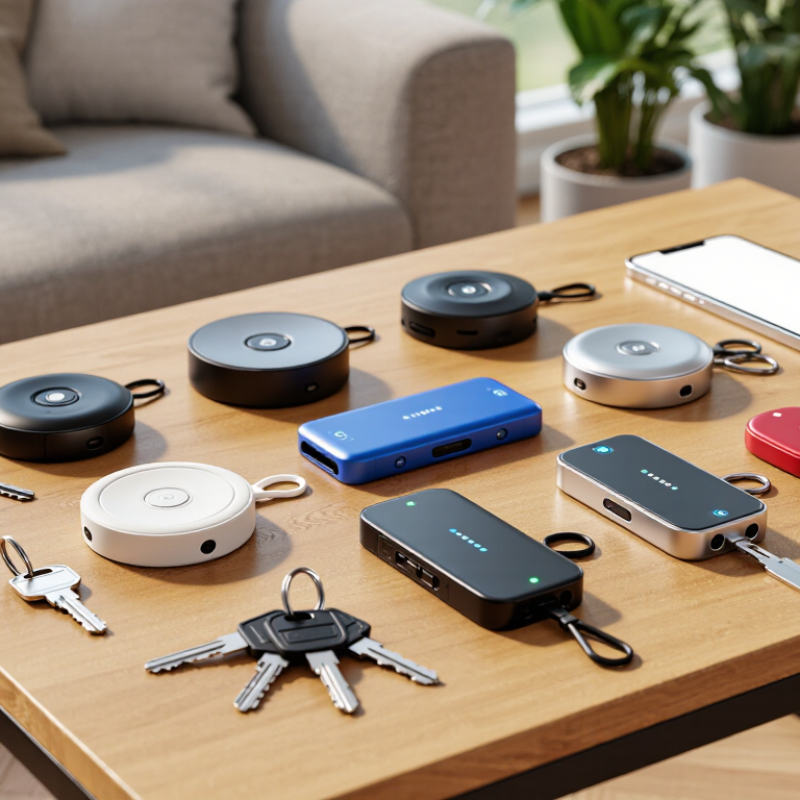
Comparing ten key locator devices means looking beyond advertised range. Four compact Bluetooth trackers generally work best inside homes or nearby streets, with practical reach often reduced by walls, furniture, and interference. Two models add ultra-wideband guidance, showing a closer directional cue when paired phones support it. Handy, but not magic. A crowded apartment can still confuse the search.

Two network-assisted tags rely on nearby compatible phones to report a missing item’s location. Their reach can extend far beyond Bluetooth, but updates depend on other devices passing nearby. One radio-frequency locator pairs a key fob with a dedicated handheld receiver; it can be simple and phone-free, though its search area is usually local. One GPS-and-cellular tracker can report location over wider areas, but it is larger, needs charging, and may require a service plan. That trade-off is easy to overlook.

Compatibility matters as much as range. Check the phone’s operating system, app support, and whether precise-finding features need newer hardware. Battery designs also differ: replaceable cells reduce downtime, while rechargeable units avoid buying coin batteries. In a real room, a test can flatter any device; metal doors and thick walls change results. I would compare each locator in the place keys are actually lost, not just in an open hallway.

How to Set Up and Use a Key Finder Effectively

A key finder works best when setup begins beside the keys, not after they disappear. Install its companion app, enable Bluetooth, and follow the pairing prompts while the finder is nearby. Give it a clear label, such as “front-door keys,” and attach it firmly to a key ring or pouch. Check the battery status now.

Test both directions before relying on it. Tap the app and listen for the finder’s chirp. Then press its button to locate your phone, if the model supports two-way finding. Try this from another room, since walls and appliances can weaken Bluetooth range. The sound may seem surprisingly quiet inside a coat pocket. Adjust the volume or placement, if those options are available.

Set separation alerts only after checking how your phone handles background app activity and notifications. Some phones pause apps to save power, so an alert may arrive late; test it during an ordinary walk. Keep expectations realistic: Bluetooth helps nearby, while crowd-assisted location depends on compatible devices and network access. Review location permissions and share access only with people you trust. I still forget to test mine. That is the weak point.

Article Source:

REQUEST FOR PORPOSAL

Bring the essence of Current to your space! Whether you envision a cozy coffee kiosk, a stylish window café, a dynamic coffee bar, or a multi-station coffee drive-through, the possibilities are endless.  Please fill out the form below to submit your proposal request. Our team will review your information and get back to you shortly.