Top 5 Vision Inspection Workstation Tips for Better Quality Control?
In today's competitive manufacturing landscape, implementing effective quality control measures is crucial. Experts emphasize the importance of a “Vision Inspection Workstation” in achieving superior product standards. As noted by Dr. Emily Chang, a leading authority in industrial automation, "A well-structured Vision Inspection Workstation can significantly reduce error rates in production."
Quality control is not simply about monitoring products; it's about continuous improvement. Many organizations underestimate the significance of proper workstation setup. Small adjustments could lead to substantial benefits, reflecting in overall product quality. Effective vision systems detect flaws early, preventing costly post-production issues.
However, many facilities struggle with common pitfalls. Some workstations lack proper lighting or aren't equipped with the best technology. Addressing these concerns often requires a shift in mindset. Embracing a culture of precision can transform how operators perceive their tasks. A proactive approach ensures that the Vision Inspection Workstation serves its purpose effectively, promoting reliable output.
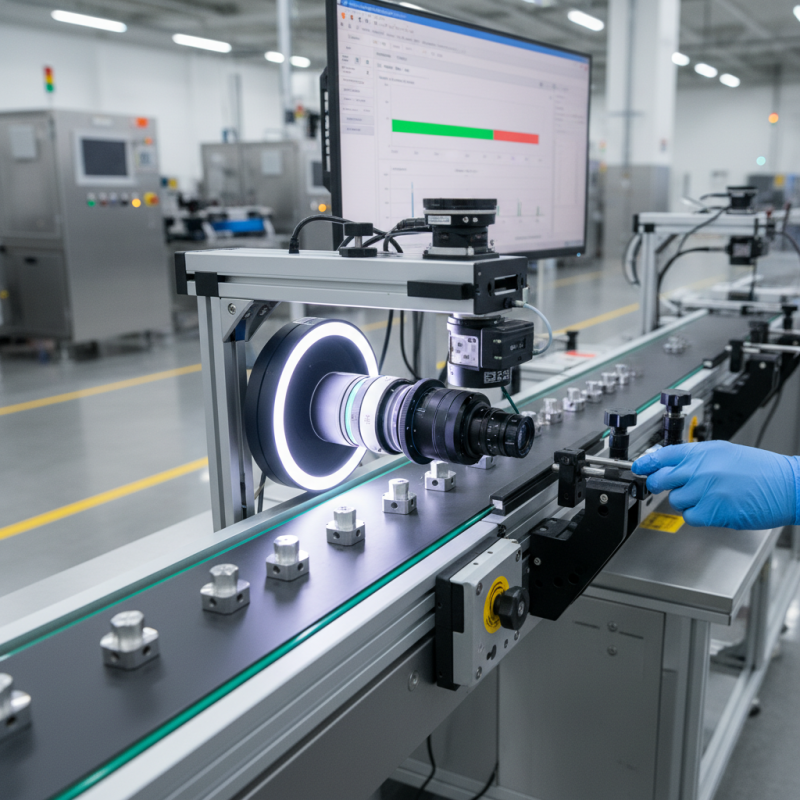
Choosing the Right Location for Your Vision Inspection Workstation
When setting up a vision inspection workstation, location plays a crucial role. The workstation should be placed in a well-lit area. Adequate lighting reduces shadows and enhances clarity. Inspectors need to see details clearly. A consistent light source is key to reliable inspections.
Noise can be distracting, affecting focus. Position the workstation away from loud machines. A quiet environment helps inspectors maintain accuracy. Consider airflow as well. Dust and debris can compromise inspections. Choose a location with minimal airborne particles.
Employ proper ergonomics in the setup. The workstation should be at a comfortable height. Inspections require sustained attention. Discomfort can lead to mistakes. Regular breaks can help, but the setup should encourage a natural posture.
Invest time in the layout. A well-organized space saves time and reduces errors. Equipment should be within easy reach. Cables and tools should not clutter the area. Regular evaluation of the workstation will illuminate areas for improvement. Consider feedback from inspectors; their insights are invaluable.
Ensuring Optimal Lighting Conditions for Accurate Inspections
Ensuring optimal lighting conditions is crucial for accurate inspections in vision inspection workstations. Poor lighting can lead to missed defects and lower product quality. To achieve the best results, use diffused lighting to minimize shadows and glare. This promotes a more uniform illumination across the inspection area. Bright, even lighting helps operators distinguish between subtle variations in color and texture.
Consider the color temperature of your lights. A cool white light mimics natural daylight, enhancing detail recognition. However, too much brightness can create reflections that confuse operators. Dim lighting can result in oversights during inspections. Testing various setups can help find the sweet spot of adequate brightness without glare.
Additionally, don’t overlook the cleanliness of your lenses and lighting fixtures. Dust or smudges can obscure vision, dramatically affecting the inspection quality. Regular maintenance is essential. Encourage operators to report any issues with lighting immediately. This fosters a culture of vigilance and continuous improvement within the quality control process. Proper lighting, combined with these practices, lays the foundation for effective inspections and improved product standards.
Top 5 Vision Inspection Workstation Tips for Better Quality Control
| Tip | Description | Benefits | Recommended Level |
| Ensure Optimal Lighting | Use consistent, even lighting to eliminate shadows and glare. | Improves detection accuracy and reduces false rejects. | High |
| Calibrate Regularly | Ensure all equipment is calibrated to maintain accuracy. | Enhances reliability of inspection results over time. | Medium |
| Train Operators | Provide comprehensive training on equipment and processes. | Reduces operator errors and increases efficiency. | High |
| Use High-Quality Cameras | Select cameras with high resolution and suitable spectral ranges. | Improves detail and accuracy of inspections. | High |
| Implement Clear Workflows | Establish standardized procedures for inspections. | Facilitates consistency and repeatability in inspections. | Medium |
Integrating User-Friendly Software for Seamless Operation
In modern manufacturing, integrating user-friendly software into vision inspection workstations can significantly enhance quality control. A recent industry report highlighted that 75% of organizations using intuitive software saw a 30% reduction in inspection errors. This is crucial as manual errors can lead to costly rework or product recalls. Streamlined software interfaces can simplify complex inspection processes, making it easier for operators to identify defects quickly.
Effective software should offer real-time data analysis. An analysis by ABC Research indicated that companies utilizing real-time analysis can improve defect detection rates by up to 40%. However, while these advancements are promising, it's essential to address the learning curve. Employees may resist adopting new tools, which can hinder quality control improvements. Moreover, not all teams might benefit equally from advanced software, leading to inconsistencies in operational effectiveness.
Fostering a culture of training can alleviate some of these challenges. Conducting regular workshops encourages collaboration and skill development. It's also important to gather feedback from users regularly. This ensures that the software evolves based on actual experiences and needs. Aligning technology with user insights can create a more robust quality control process. Thus, while user-friendly software holds great potential, continuous evaluation and adaptation are key to maximizing its benefits.
Regular Maintenance and Calibration of Inspection Equipment
Regular maintenance and calibration of inspection equipment is crucial in vision inspection workstations. According to the Industry Standards for Quality Assurance, nearly 30% of inspection errors can be attributed to faulty equipment. Routine checks can help mitigate these risks. A well-calibrated system ensures that accuracy remains within tolerable limits, which is vital for producing quality outputs.
Over time, wear and tear on components can lead to unpredicted malfunctions. For example, misalignment of cameras can result in overlooked defects. Regularly scheduled maintenance can catch these issues before they escalate. Industry data points toward a significant increase in overall production efficiency—up to 20%—when inspections are performed with accurately calibrated tools.
It's essential to develop a maintenance schedule tailored to specific equipment needs. Equipment that is often neglected can contribute to increased scrap rates and wasted resources. A comprehensive log of maintenance activities can foster accountability and reveal patterns that necessitate further investigation. Reflecting on past inspection failures can provide valuable lessons, highlighting the importance of keeping inspection tools in optimal condition.
Top 5 Vision Inspection Workstation Tips for Better Quality Control
This chart displays the effectiveness of regular maintenance and calibration of inspection equipment in improving quality control in manufacturing processes.
Training Staff for Effective Use of Vision Inspection Systems
Training staff for effective use of vision inspection systems is crucial for maintaining quality control. Employees should understand how these systems work. Knowledge of the technology enhances their ability to detect defects. The training program should include hands-on demonstrations and real-case scenarios. This approach helps build confidence among staff.
Tip 1: Regular training updates are important. Technology and procedures change frequently. Keeping staff informed about the latest developments ensures they remain competent. This can lead to fewer errors in the production line.
Tip 2: Encourage feedback. Staff on the ground can offer valuable insights. They might identify areas of improvement in the current process. Listening to their suggestions fosters a culture of continuous improvement.
Investing time in training creates a more skilled workforce. Accurate operation of vision inspection systems can significantly reduce product rework. Without proper training, even the best technology can fail. It is essential to approach training with an open mind. Recognizing that improvements can always be made benefits everyone.